Rain Cover
Rain shouldn't fall through roofs. The rain cover map is how Puddlecraft knows where they are: for each spot of ground, it stores the height of the highest thing above it, and that's where the rain stops.
Rain, splashes, raindrop ripples, wet ground and puddle queries from scripts all read it, which is why the ground under a roof stays dry. How sheltered the rain sounds is a separate question, answered by Cover Volumes.
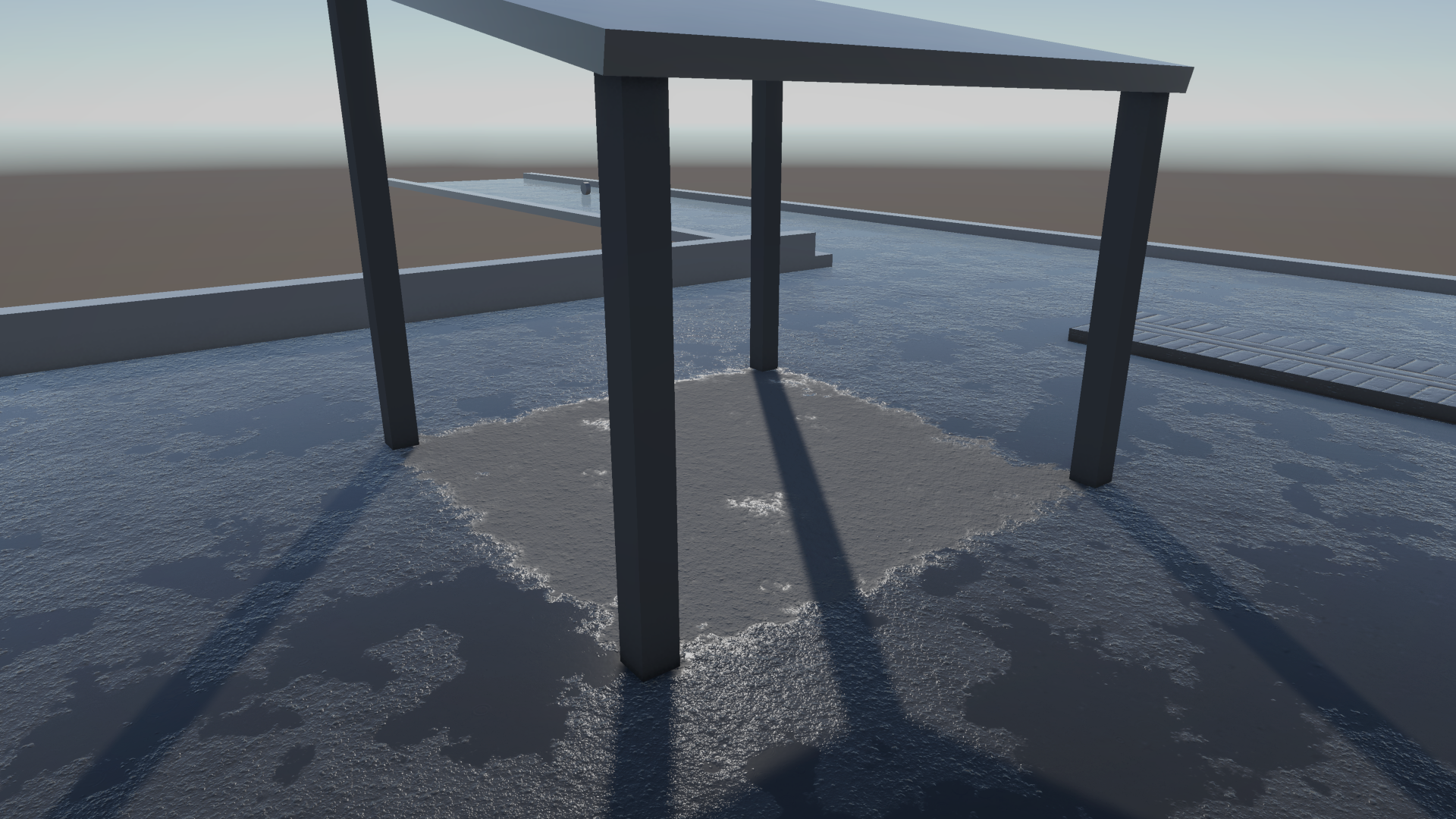
Only renderers on the controller's Gets Wet and Blocks Rain layers count as cover (see the controller's Setup tab), plus Cover Volumes with Blocks Rain on.
Modes
Controller > Baking > Rain Cover > Mode picks where the map comes from:
| Mode | How it works | Use it when |
|---|---|---|
| Realtime (default) | Drawn from above around each camera: a detailed near square with everything, and a coarse far square of static objects. | Almost always: worlds of any size, moving covers (vehicles, doors, characters), no bake. |
| Baked | Ray-traced once in the editor and saved next to the scene, as one top-down grid of 25 cm cells (at most 2048 x 2048). The grid spans the controller's scene: every mesh renderer on the Gets Wet and Blocks Rain layers that the bakes use (Static ones only by default; see What bakes use on the Baking tab), and every Cover Volume with Blocks Rain on. | Small scenes (up to about 500 m across) whose roofs don't move, when you want zero runtime cost. |
Baked gets coarse in big scenes. The cells grow to fit (a 4 km world gets 2 m cells) and the map takes 16 MB. The grid only spans the controller's scene, but renderers in other loaded scenes that fall inside it are baked in too.
To bake, press the Bake button on the Baking tab or use Tools > Puddlecraft > Bake Rain Cover. Save the scene first; the bake needs it.
How Realtime stays cheap
Each camera gets two maps. The near one is a detailed square with everything in it, moving objects included. The far one is a coarse square with static objects only, so distant roofs stay dry without Puddlecraft having to watch moving objects that far away.
Both are scrolling textures. Once the camera has moved one Update Step, the map shifts with it, and because the texture wraps around, only the strip that just came into view is drawn. Walk 1 m left and only 1 m of texels is redrawn. Stand still and nothing is drawn at all.
Objects that aren't static are watched, and the map is redrawn where they moved. In the editor outside Play mode, every object is watched, so moving a static roof updates the map straight away.
| Setting | What it does |
|---|---|
| Near Distance | Side of the detailed square around the camera, in metres. Everything shelters here, moving objects included. Rain particles land within about half of it, or half the far square when there is one. |
| Near Resolution | Texels per side. Near Distance / Near Resolution is the smallest overhang that keeps rain off (64 m / 512 = 12.5 cm). |
| Far Distance | Side of a coarser square of static objects only (those marked Static, plus Cover Volumes that block rain), in metres, so distant roofs stay dry without tracking moving objects that far out. 0, or no more than Near Distance, turns it off. Default 256 m. |
| Far Resolution | Texels per side of the far square (256 m / 1024 = 25 cm). |
| Update Step | How far the camera moves before the near map follows. The far map follows in steps of at least four of its texels. |
| Moving Objects | Redraw the near map where non-static renderers move. Moving objects are only drawn into the near map. |
Realtime limits
- Only mesh and skinned mesh renderers (LOD 0) are drawn. Terrain isn't (the baked map skips it too), so splashes don't land on it.
- Shadow-only renderers count as cover, just like in the bake. They're often the real roof over an interior.
- Beyond the far square (or the near one, with no far square), rain falls everywhere. Mark buildings Static so they shelter out to the far distance. In a build, only objects saved as Static in a scene count as static; anything spawned at runtime counts as moving.
- The other simulation distances (ripples, raindrop rings, how far drip edges and spouts are simulated) are on the controller's Setup tab, under Simulation Distances.
Cover edges and wind
Under roofs the ground stays dry, with a soft border. Rain reaches a little way in under a roof edge, wet at the roof line and fading to dry along a ragged edge (Rain Preset > Wet Ground > Cover Edge). Wind blows rain further in under the windward edge of a roof. Procedural puddles shrink back near the edge instead of being cut off along it. Undersides always stay dry.
From scripts
The controller's coverMode and realtimeCover hold these settings. A baked map is a RainCoverData asset, which can tell you whether a point is open to the sky (IsExposed).